 Beau Monde!
How it works in your classroom
A typical week takes almost no prep.
- Create your classChoose the grade, and the app makes a class with a code. Add students and print a login card for each one.
- Students log in on any deviceThey type the account name and password from their card. No emails, no sign-up, nothing to install.
- Practise a little, oftenStudents work through the path and earn game time. You can set a pacing limit so the class stays together, or assign a specific topic.
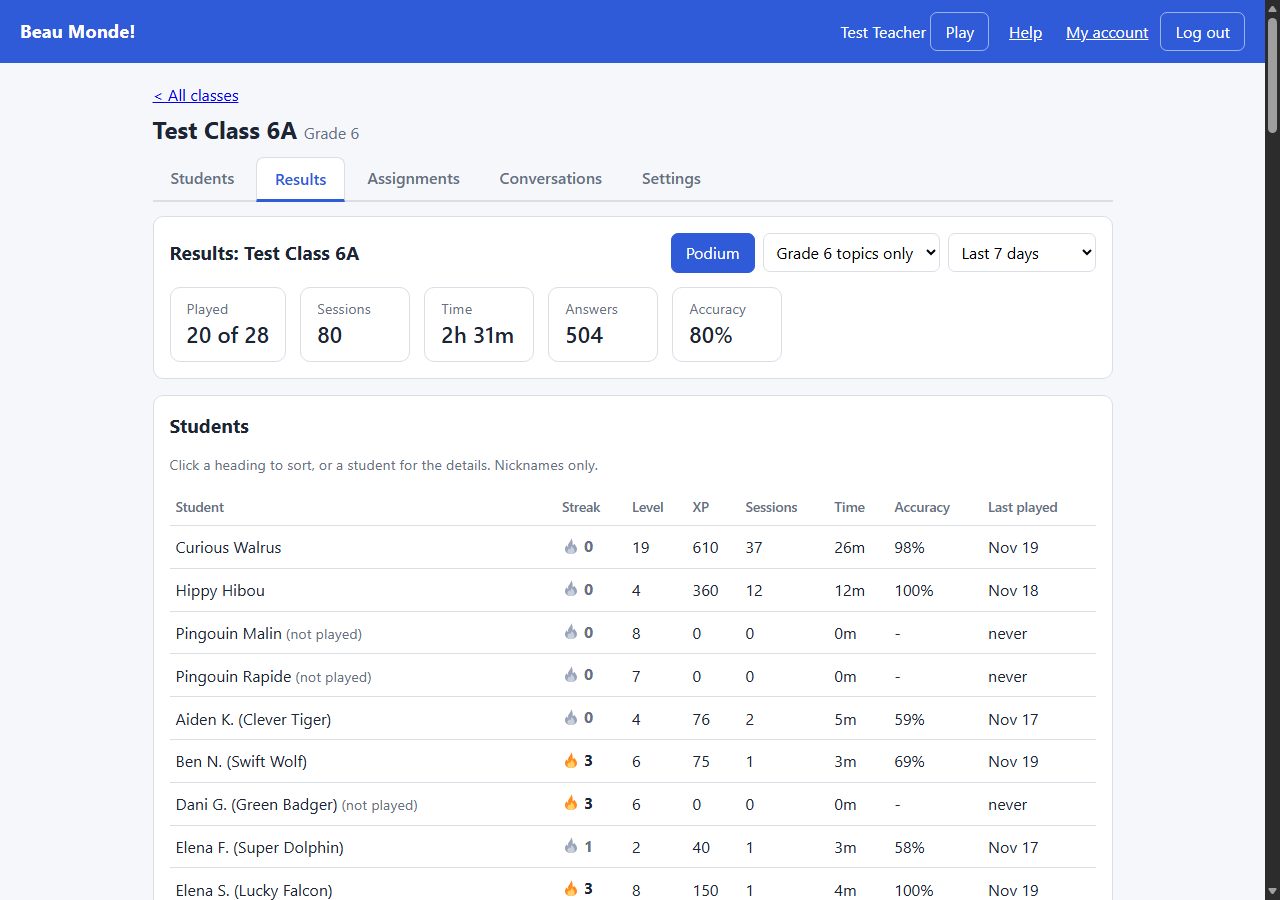
- See what to teach nextThe dashboard shows the words the class finds hard, who has not practised, and each student's progress. The teacher guides that come with the app walk you through every page, and a printable summary for your grade lists every lesson.
What the dashboard shows
- Each student's lessons, accuracy, streak and time played
- The hardest words for the class, ready for a mini-lesson
- Assignments, pacing limits and spoken French voice clips
- A class leaderboard and Top 3 podium to encourage engagement
Curriculum coverage
Grades 6, 7 and 8 are live, with nine units each, matched to the BC Core French curriculum. Teacher summary PDFs list every lesson and its "I can" statement.
Request a teacher account
Accounts are approved by hand, so student data stays with the right school. Tell us a little about you and you will get an invite code by email, usually within a few school days.
Already have an invite code? Create your teacher account. Already have an account? Teacher login.